Docs2Synth
A Synthetic Data Tuned Retriever Framework for Visually Rich Documents Understanding
A complete pipeline for converting, synthesizing, and training retrievers for your document datasets
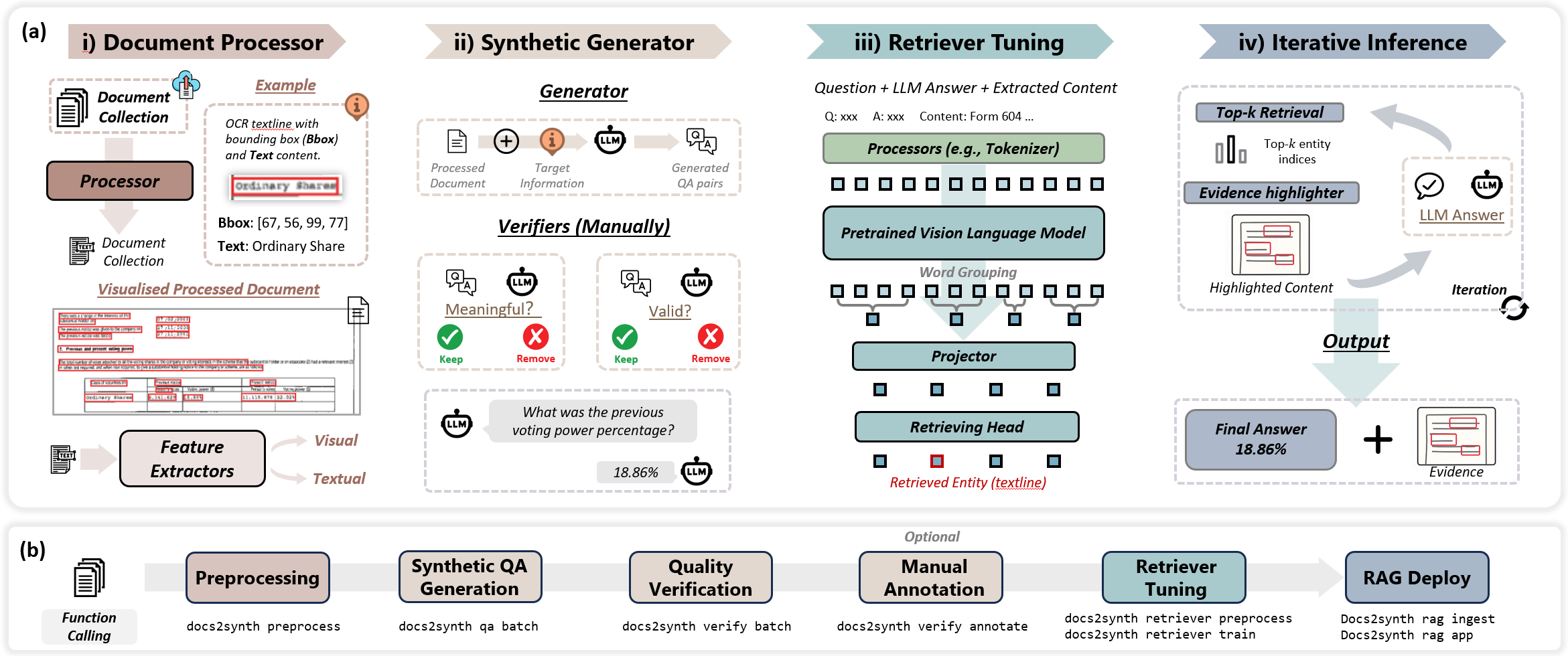
 Key Features
 Document Processing
Extract structured text and layout from PDFs and images using Docling, PaddleOCR, or PDFPlumber. Support for complex layouts and 80+ languages.
 Agent-Based QA Generation
Automatically generate high-quality question-answer pairs using LLMs. Built-in verification with meaningfulness and correctness checkers.
 Retriever Training
Train custom document retrievers using LayoutLMv3 or BERT on your annotated data. Support for layout-aware and semantic retrieval.
 RAG Deployment
Deploy RAG systems instantly with naive, iterative, or custom strategies. Vector store integration with semantic search.
 Benchmarking
Comprehensive evaluation with ANLS, Hit@K, MRR, and NDCG metrics. Track training progress and model performance.
 Extensible Pipeline
Modular architecture with pluggable components. Easy customization of QA strategies, verifiers, and retrieval methods.
🔌 MCP Integration
Run Docs2Synth as a remote MCP server (SSE transport) for AI agents like Claude Desktop, ChatGPT, and Cursor. Access document processing capabilities from your AI tools.
Installation
PyPI Installation (Recommended)
CPU Version (includes all features + MCP server):
GPU Version (includes all features + MCP server):
# Standard GPU installation (no vLLM)
pip install docs2synth[gpu]

# With vLLM for local LLM inference (requires CUDA GPU)
# 1. Install PyTorch with CUDA first:
pip install torch torchvision torchaudio --index-url https://download.pytorch.org/whl/cu128

# 2. Install docs2synth with vLLM:
pip install docs2synth[gpu,vllm]

# 3. Uninstall paddlex to avoid conflicts with vLLM:
pip uninstall -y paddlex
vLLM and PaddleX Conflict
PaddleX conflicts with vLLM. If you need vLLM support for local LLM inference, you must uninstall paddlex after installation: pip uninstall -y paddlex
Minimal Install (CLI only, no ML/MCP features):
From GitHub (Development)
Quick Start
Automated setup (recommended):
git clone https://github.com/AI4WA/Docs2Synth.git
cd Docs2Synth
./setup.sh         # Unix/macOS/WSL
# setup.bat        # Windows
The script installs uv and sets up everything automatically.
Manual setup:
git clone https://github.com/AI4WA/Docs2Synth.git
cd Docs2Synth
pip install -e ".[dev]"
cp config.example.yml config.yml
# Edit config.yml and add your API keys
See the README for details.
Workflow
graph LR
    A[Documents] --> B[Preprocess]
    B --> C[QA Generation]
    C --> D[Verification]
    D --> E[Human Annotation]
    E --> F[Retriever Training]
    F --> G[RAG Deployment]
🚀 Quick Start: Automated Pipeline
Run the complete end-to-end pipeline with a single command:
This automatically chains: preprocessing → QA generation → verification → retriever training → validation → RAG deployment.
Manual Step-by-Step Workflow
For more control, run each step individually:
# 1. Preprocess documents
docs2synth preprocess data/raw/my_documents/

# 2. Generate QA pairs
docs2synth qa batch

# 3. Verify quality
docs2synth verify batch

# 4. Annotate (opens UI)
docs2synth annotate

# 5. Train retriever
docs2synth retriever preprocess
docs2synth retriever train --mode standard --lr 1e-5 --epochs 10

# 6. Deploy RAG
docs2synth rag ingest
docs2synth rag app
Architecture
Docs2Synth/
├── integration/    # Integration utilities
├── preprocess/     # Document preprocessing
├── qa/            # QA generation and verification
├── retriever/     # Retriever training and inference
├── rag/           # RAG strategies
└── utils/         # Logging, timing, and utilities
Contributing
We welcome contributions! Please see our GitHub repository for guidelines.
License
This project is licensed under the MIT License.
Support
- Report issues: GitHub Issues
- Documentation: Full documentation